![pdfforge_fav-2.png]](https://support.pdfforge.org/hs-fs/hubfs/pdfforge_fav-2.png?height=40&name=pdfforge_fav-2.png)
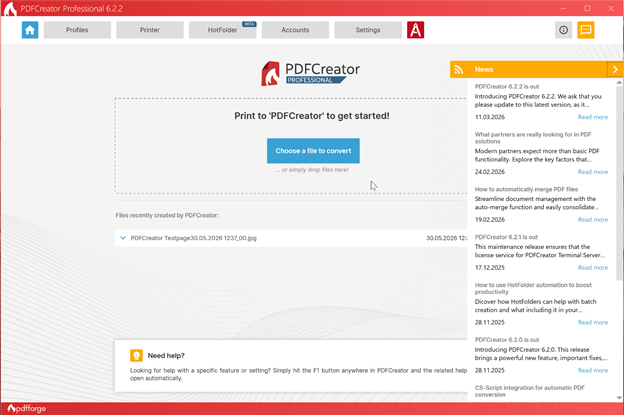
Navigation Bar

Home 🏠. The default landing page of PDFCreator. It provides quick access to file conversion tools, recently created documents, and informational messages from our developers.
Profiles. A profile in PDFCreator is a configurable workflow that determines how documents are converted, saved, and processed after being submitted to the PDFCreator printer.
Printer. The configuration area for the PDFCreator virtual printer.
HotFolder. A tool for automated file processing. HotFolder monitors specified folders and automatically converts files whenever new documents are added.
Accounts. Manage connections to external services and storage providers.
Settings. The central location for application-wide settings.
File Conversion Area

Choose a File to Convert allows users to select a file directly from Windows Explorer for conversion.
Drag & Drop. You can simply drag files into the conversion area to start processing. This provides a convenient alternative to printing through the virtual PDFCreator printer.
Recently Created Files
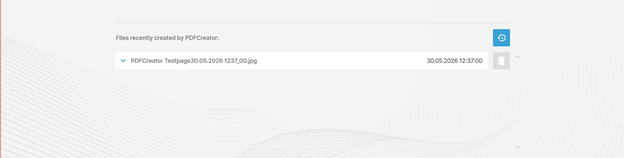
The Files recently created by PDFCreator section displays documents that were recently generated by the application. This area allows users to: quickly access converted files, review creation dates and view recent processing activities.
News Panel
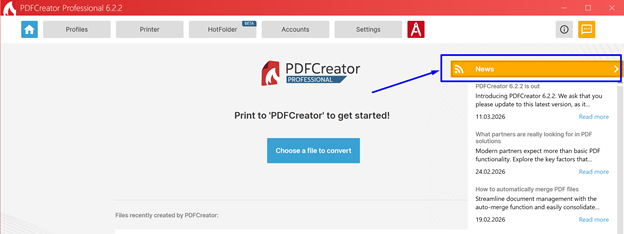
The News panel provides information about new PDFCreator releases, product updates and announcements, feature highlights and best practices, Links to additional resources and articles. The content is updated automatically when an Internet connection is available.
Help Section

It provides guidance on using the built-in help system. To quickly access context-sensitive help, press F1 anywhere within PDFCreator. The application will automatically open the relevant documentation page for the current section.
Additional Buttons
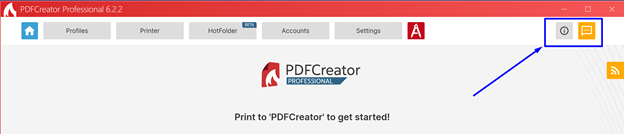
Information 🛈. Opens the About dialog, which contains User guide, Knowledge base, Community support (Forums), Priority support, Feedback. And also version of PDFCreator.
Feedback/Messages. Provides access to submit feedback or contact support for assistance.